

Abbas Dhami
Specialist Diagnostic Radiographer
Have you ever left a doctor's appointment still wondering why your pain has not been explained? You are not alone. Many patients go through traditional X-rays lying flat on a table only to be told everything looks fine, even when something clearly does not feel right. The problem is often not the patient. It is the position.
When you lie down, your spine, pelvis, and joints relax. Gravity is removed from the equation. That means certain alignment problems, curvatures, and imbalances simply do not show up. This is exactly why upright imaging is changing how doctors diagnose and plan treatment.
The EOS imaging system is one of the most advanced tools in modern musculoskeletal medicine. It scans your body while you are standing exactly how you live, move, and carry weight every day. The result is far more accurate and meaningful diagnostic images.
In this guide, we will walk you through the entire EOS imaging procedure from start to finish: before your appointment, during the scan itself, and what happens after.
What Is an EOS Scan in Simple Terms?
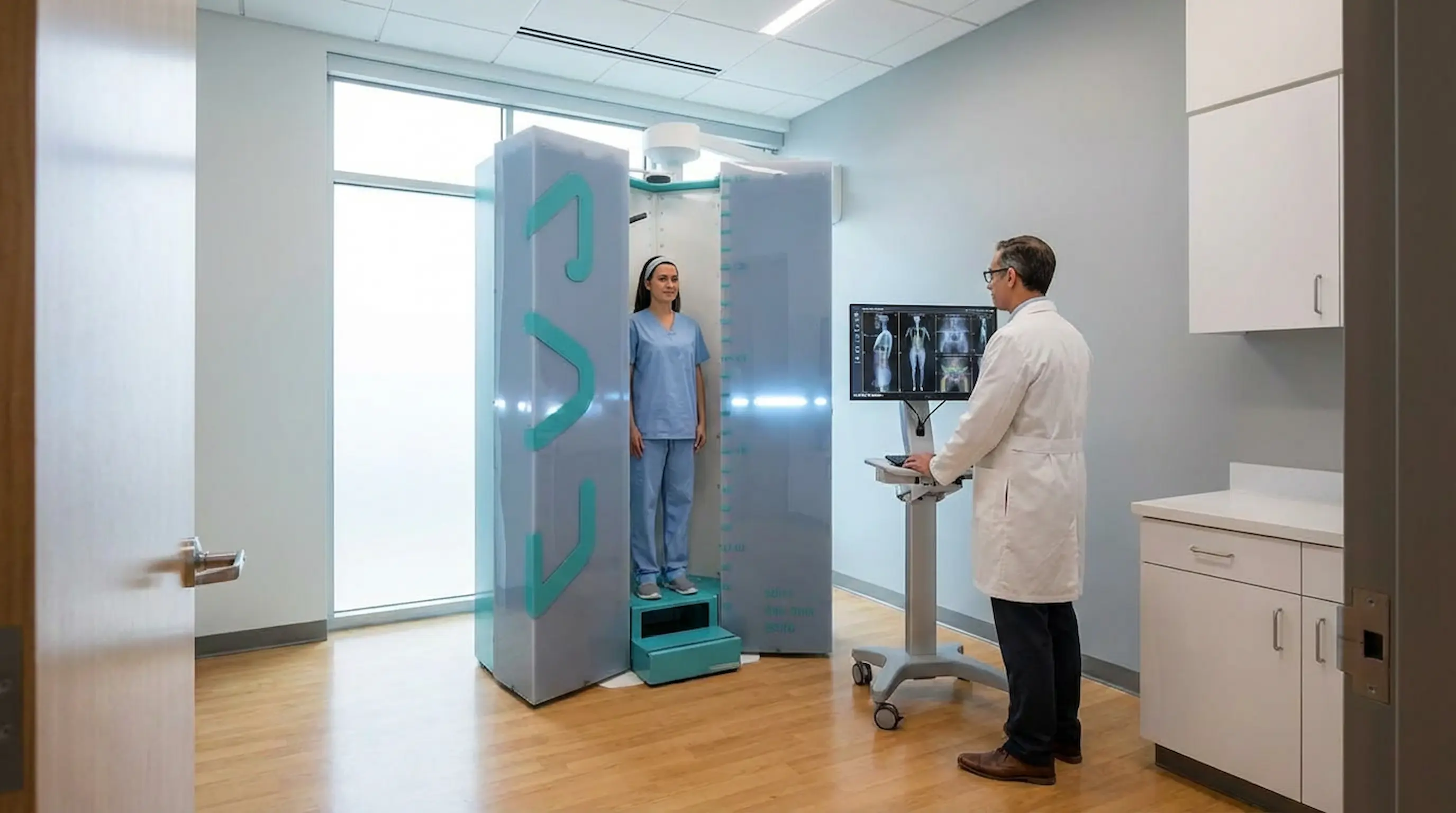
The EOS imaging system is a specialised, low-dose X-ray technology designed specifically for musculoskeletal assessment. Unlike a standard X-ray machine, EOS captures the full skeleton in a single, continuous image while the patient is standing upright.
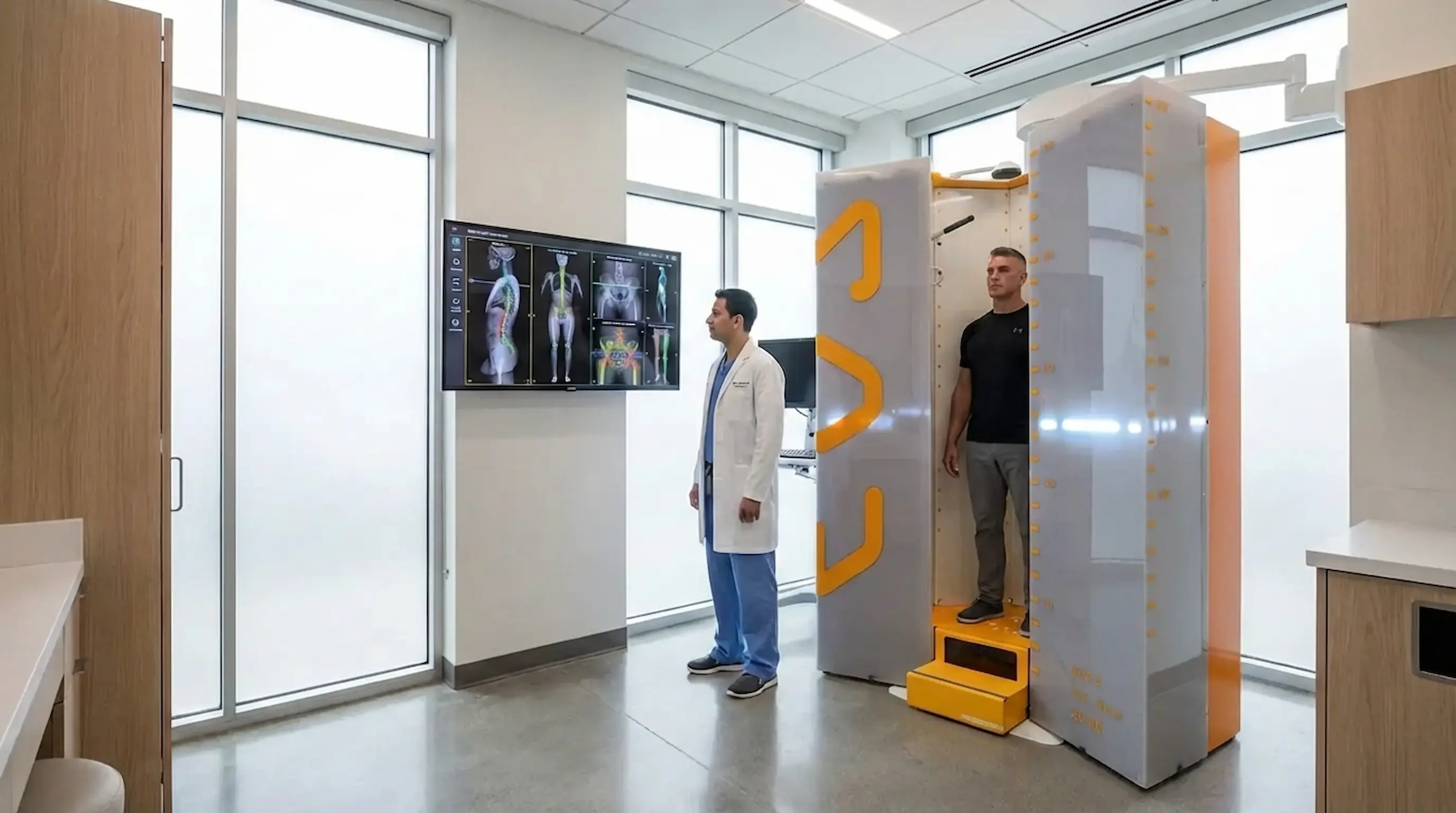
It uses two detectors positioned at right angles to each other, capturing both a front view and a side view at exactly the same moment. This simultaneous capture allows clinicians to build a highly accurate 3D orthopaedic imaging model of your skeleton, showing how every part of your body aligns in real life.
To learn more about what an EOS scan is and how the technology works, visit our detailed guide: What Is an EOS Scan.
The Science of Gravity: Why Doctors Use Upright, Weight-Bearing Imaging
Standing changes everything when it comes to how your skeleton looks on a scan. Your posture under gravity tells a very different story from a lying-down image.
How Weight-Bearing Imaging Changes Your Skeleton's Appearance
Your body looks different when you are standing. The spine compresses slightly, the pelvis tilts to support your torso, and the knees and hips share your body weight. These natural changes are invisible in a lying-down scan, but they are exactly what doctors need to see.
Weight-bearing imaging allows the scan to reflect the true loaded position of your skeleton. A small misalignment in the pelvis, for example, might only become visible when gravity is involved. The same applies to leg-length differences, hip offset, and spinal curves.
The “Muscle Engagement” Factor in Accurate Diagnosis
When you stand, your muscles engage to keep you balanced and upright. This muscle activity directly influences how your bones sit relative to each other. A lying-down scan completely removes this factor.
Upright imaging captures posture as it actually is, not as it appears in a relaxed, gravity-free position. This is why EOS imaging consistently reveals problems that standard X-rays can miss.
When an EOS Scan May Be Recommended
EOS imaging is not just for one type of patient or condition. Doctors across several specialities use it to get accurate, standing-position data for a wide range of musculoskeletal concerns.
Posture, Spinal, and Lower-Limb Alignment Concerns
Doctors and specialists may recommend an EOS scan for a wide range of reasons, including:
- Suspected or confirmed scoliosis
- Unexplained back, hip, or knee pain
- Poor posture or visible asymmetry in the spine or pelvis
- Leg-length discrepancy
- Knee or hip alignment issues
Pre-Surgery Planning and Post-Surgery Monitoring
EOS imaging is also widely used before and after orthopaedic surgery. Before an operation, it helps surgeons plan with precision. After surgery, it allows them to monitor how well the body has responded and whether any adjustments are needed.
Athletes and active individuals may also benefit from EOS scans for biomechanical assessment, especially when subtle alignment issues may be contributing to discomfort or injury risk.
How to Prepare: EOS Scan Before Your Appointment
A little preparation goes a long way. Getting ready properly helps the scan run smoothly and supports the clearest possible images.
What to Wear
Wear comfortable, loose-fitting clothing on the day of your scan. Avoid anything with metal zips, studs, or underwires. Your clinic may provide a gown, but wearing something simple reduces the chance of needing to change completely.
What to Remove Before the Scan
Before entering the scanning cabin, you will need to remove metallic items such as belts, jewellery, underwired bras, and hair accessories with metal components. Metal objects can interfere with image quality and should be removed fully.
What to Bring
Bring your referral letter or appointment confirmation. If a specialist has referred you, carry any relevant medical history or previous scan results. This helps the radiographer and reporting clinician understand your case more clearly.
How to Mentally Prepare
Many people feel anxious before any kind of scan. The reassuring truth is that an EOS scan is nothing like an MRI. There is no tunnel, no enclosed space, and no loud noise. The EOS machine is an open, upright cabin. You simply stand inside it for a short time. It is completely non-invasive, takes under a minute, and does not involve injections or preparation medication.
If you have questions before arriving, our patient support team is available to help.
What Happens During an EOS Scan? Step-by-Step
This is the part most patients want to know about. Here is exactly what happens from the moment you arrive to the moment the scan is complete.
- Arrival and Check-In: When you arrive at the clinic, a staff member will check you in and confirm your appointment details. The radiographer will explain what is about to happen.
- Getting Ready for the Scan: You will be asked to remove metal items. If needed, you may be given a gown to wear. The radiographer will then guide you on how to position yourself.
- Standing in the Open EOS Scanner: You will step into the EOS cabin and stand in a natural upright posture. The scanner is open, so it does not feel enclosed or intimidating.
- Staying Still While Images Are Taken: Once you are positioned correctly, you will be asked to stay still briefly while the scanner captures front and side images at the same time.
- How Long the Scan Usually Takes: The actual image capture usually takes around 15 to 20 seconds. The full appointment typically lasts around 20 to 30 minutes.
- When the Scan Is Finished: Once the scan is complete and image quality has been checked, you can get dressed and continue with your normal day straight away. There is no recovery time.
Decoding Your Diagnosis: What Does an EOS Scan Show?
Once your scan is complete, the real value lies in what the images reveal. EOS provides far more clinical detail than a standard X-ray ever could.
Advanced 3D Orthopaedic Imaging Explained
Once the front and side images are captured simultaneously, specialist software uses them to construct a personalised 3D orthopaedic imaging model of your skeleton. This three-dimensional model allows clinicians to assess alignment, angles, and balance with a level of precision that flat, two-dimensional X-rays simply cannot provide.
Uncovering Posture Imbalances and Micro-Misalignments
An EOS scan can reveal:
- Spinal curvature, including scoliosis or kyphosis
- Pelvic tilt and rotation
- Hip and knee alignment issues
- Leg-length differences
- Overall skeletal balance
These findings, captured in a natural standing position, give your clinician a far more accurate picture of what is actually happening in your body.
What Happens After the EOS Scan Appointment?
Many patients want to know what comes next once the scan is over. The good news is that the process is simple.
- After the Images Are Taken: There is no downtime after an EOS scan. You can drive, work, exercise, or carry on with your day as planned.
- How Results Are Used: Your images are reviewed by a specialist clinician, who prepares a detailed report based on your 3D skeletal model.
- What the Next Step May Be: Depending on the findings, the next step may involve a follow-up consultation, a treatment plan, further imaging, or reassurance that your alignment is within a healthy range.
Depending on what the scan shows, your next steps might include a follow-up consultation to discuss findings, a treatment or management plan, further imaging if needed, or in many cases reassurance that your alignment is within a healthy range. Your patient rights are fully protected throughout this process, and you are entitled to understand your results clearly.
Why EOS Imaging Can Be Especially Helpful for Scoliosis and Alignment Problems
Scoliosis is one of the most common reasons patients are referred for an EOS scan. The standing, 3D nature of EOS makes it especially useful for monitoring this condition accurately and safely.
Precision Scoliosis Imaging for Children and Adults
Scoliosis involves a three-dimensional spinal curve, not just a sideways bend. Traditional flat X-rays can give an incomplete picture. EOS captures the full spinal curve in 3D while the patient is standing, giving a much more clinically useful measurement of curve severity.
For children and young people who may require monitoring over many years, the low-dose nature of EOS is especially important. Repeated imaging at lower radiation levels is a safer long-term approach than conventional X-ray monitoring.
To explore this topic in more depth, read our dedicated article: EOS Scan for Scoliosis: Why Standing Imaging Matters.
Key Benefits Patients Should Know Before Booking
If you are still weighing up whether an EOS scan is right for you, here are some of the most important advantages to consider.
Unmatched Safety: The Low-Dose X-Ray Advantage
EOS technology follows the ALARA principle, which means “As Low As Reasonably Achievable.” The radiation dose used in an EOS scan is significantly lower than a traditional full-spine X-ray. This makes it especially appropriate for patients who require multiple scans over time, including children, adolescents, and adults undergoing long-term monitoring.
Capturing the Full Body in a Single, Continuous Image
Unlike standard imaging, which may require multiple separate exposures to cover the full spine, EOS captures the entire skeleton from head to toe in one single, simultaneous image. This reduces positional errors and gives a more accurate full-body view for analysis.
Conclusion
The EOS X-ray procedure is simpler, quicker, and more comfortable than most patients expect. From the moment you arrive to the moment you leave, the entire appointment usually takes less than 30 minutes, with the actual scan itself lasting under a minute.
What makes EOS truly different is not just the speed or the low dose. It is the quality of the information it provides. By imaging your skeleton in a natural, standing, weight-bearing position, EOS gives your clinician a real-world view of how your body is actually aligned. That supports better diagnosis, more accurate treatment planning, and more confident next steps.
Understanding what to expect before, during, and after your scan can reduce anxiety and help you feel more in control of your healthcare journey.
Book Your Free Video Consultation →FAQs
- What is an EOS X-ray? An EOS X-ray is a low-dose, full-body imaging scan performed while the patient stands upright. It captures front and side views of the skeleton at the same time and can be used to create a personalised 3D model for clinical assessment.
- How should I prepare for an EOS scan? Wear comfortable, loose clothing and remove metal items before the scan. Bring your referral letter and any relevant medical history or previous scan results.
- What happens during an EOS scan? You stand inside an open scanning cabin in a natural upright posture while the scanner captures front and side images in a single continuous pass. The process is quick, painless, and non-invasive.
- How long does the EOS imaging procedure take? The scan itself usually takes around 15 to 20 seconds. The full appointment typically lasts 20 to 30 minutes.
- What does an EOS scan show? An EOS scan can show spinal curvature, pelvic alignment, hip and knee alignment, leg-length differences, and overall skeletal balance while the body is in a natural weight-bearing position.
- Is EOS imaging the same as a normal X-ray? No. EOS uses X-ray technology, but it delivers a lower radiation dose and captures the full skeleton in a standing position, which provides more useful information for musculoskeletal assessment.
- Why is upright imaging important? Upright imaging shows how your skeleton aligns under gravity with your muscles engaged. Many alignment problems and posture-related issues are easier to detect or assess accurately in this position.
Continue reading
More articles
Is EOS Scan Safe? Radiation Levels, Risks, and FAQs
Discover if EOS imaging is safe, its radiation levels, risks, and benefits. Learn why it’s preferred for accurate, low-dose skeletal scans.

EOS Scan for Scoliosis: Why Standing Imaging Matters
Discover how EOS for scoliosis provides low-radiation imaging for accurate spinal alignment and better scoliosis diagnosis and monitoring.
Hip Pain & Alignment: EOS Imaging for Better Diagnosis
EOS imaging for hip pain reveals pelvic tilt, leg length discrepancy & spinopelvic alignment that routine scans miss. Book Appointment now.